+- www.simsforums.com - the Sims series, computer games & other nonsense since March 2008. (https://www.simsforums.com)
+-- Forum: The Sims 3 (/forumdisplay.php?fid=4)
+--- Forum: General Sims 3 Discussion (/forumdisplay.php?fid=10)
+--- Thread: [Cheats]use Quick Memory Editor to edit lifetime reward points (/showthread.php?tid=6074)
[Cheats]use Quick Memory Editor to edit lifetime reward points - kaabooboo - 02-06-2009 12:50 PM
The lifetime reward points in The Sim 3 game is showed as integer, but it's actually floating number in memory. So if you search the number by using the default data type, you can't get the memory address.
Here is the steps to edit lifetime reward points by Quick Memory Editor:
1: Start Quick Memory Editor, start The Sim 3 game, add new tast in Quick Memory Editor and select "TS3.exe" program.
2: Enter your current reward points, select data type: Floating Number, and search.
Repeat it a couple of times until the search results can't be decreased. Double click the two addresses and lock the number to 999999999.
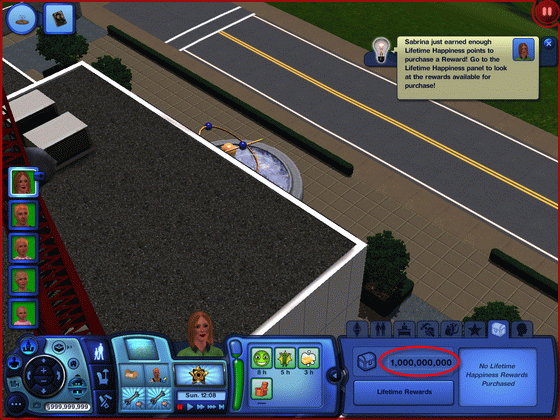
3: Back to the game. You can see your lifetime reward points is enough to buy all rewards now.
BTW: The money in this game is using integer, you can search it by using the default data type.
Check more information at http://www.softcows.com/memory_editor_sample_4.htm